WebGPU Browser renderer
Play it in your browser (Chrome, Edge, Safari 26+, Firefox on Windows):
https://play.questforterritory.com
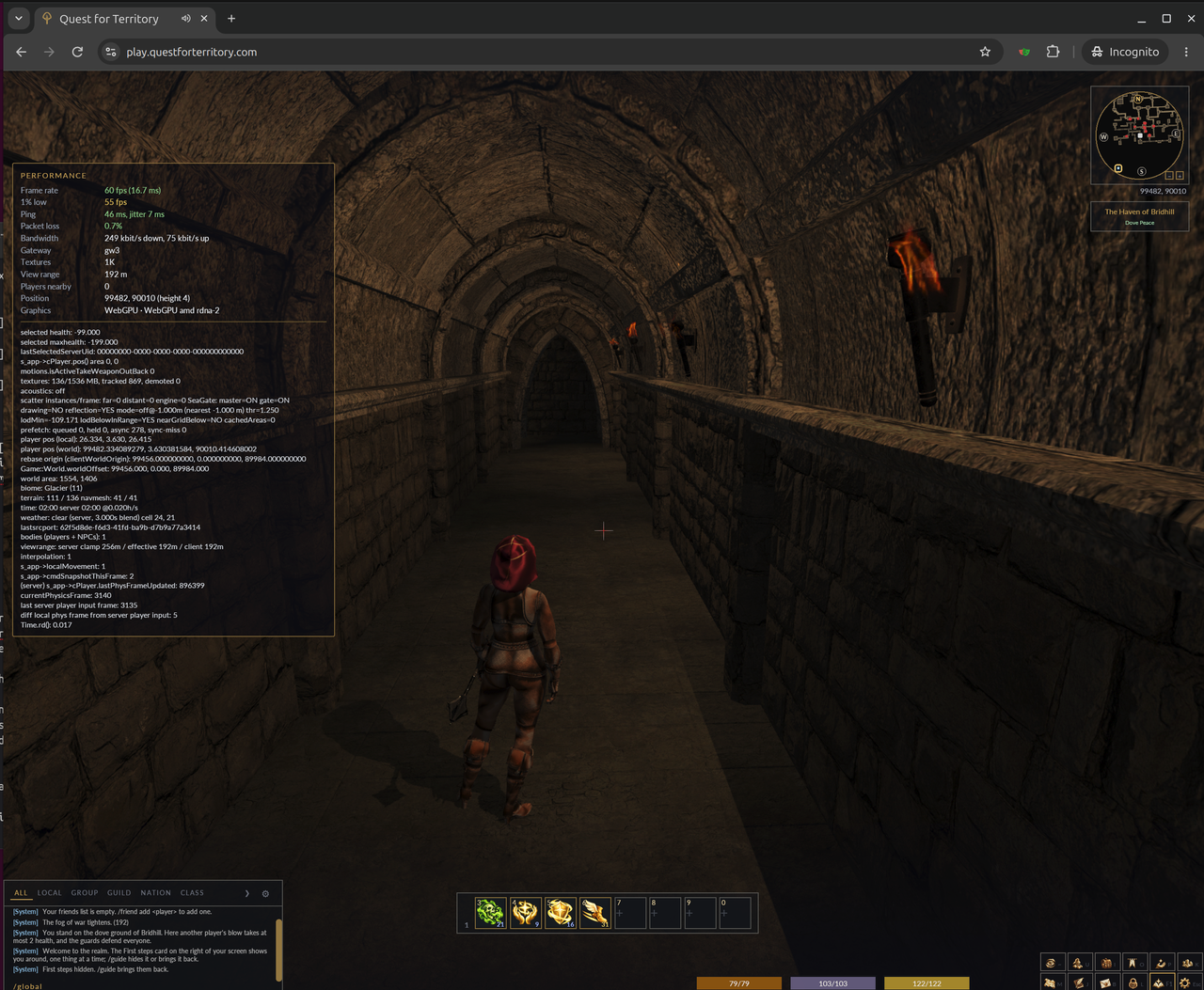
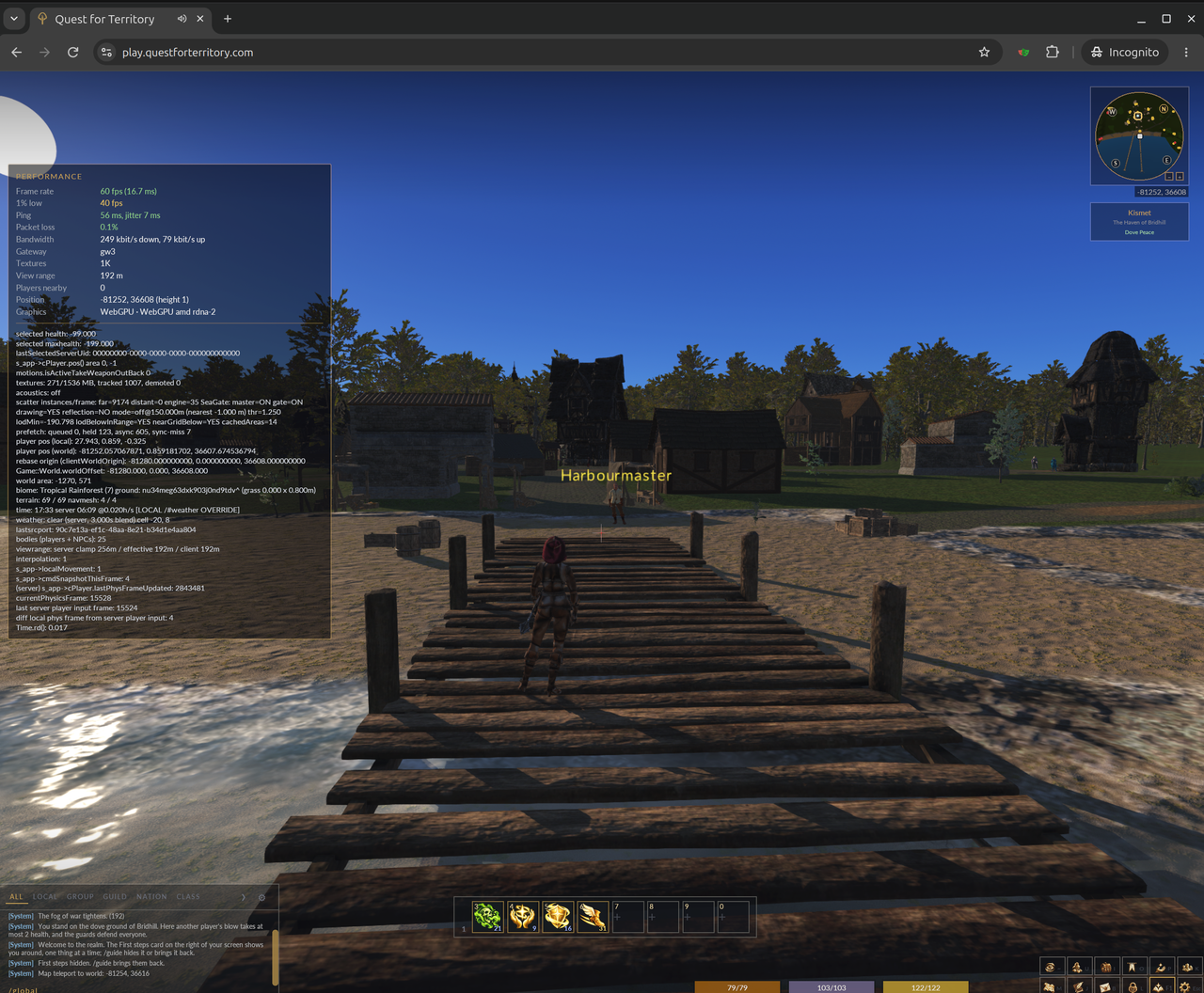
My fork of Esenthel Engine now runs in the web browser. It has a native WebGPU renderer, and the whole engine is compiled to WebAssembly. The renderer, materials, world streaming, PhysX, animation, RmlUi and the GUI are all the same engine code that runs on Windows, Linux, Android, macOS and iOS.
Quest for Territory, the online fantasy RPG I am building on this fork, is playable this way at the link above: sign in, enter the world and play online. Everything below is the engine itself; the game is just the biggest test case.
How it works
- WebAssembly. The engine and its third-party libraries (PhysX, FreeType, RmlUi, zstd and the rest) are compiled with Emscripten into one wasm32 module, with real threads (pthreads on SharedArrayBuffer).
- The engine runs in a Web Worker, not on the page's thread. It draws to an OffscreenCanvas, so a blocking wait inside the engine (a file read, a lock) never freezes the page.
- WebGPU, used directly. The backend implements the same explicit-GPU interface the Metal backend uses, so most of the shared rendering code needed no browser-specific changes. Engine/Source/Graphics/WebGPU and Platforms/Web are new.
- No separate shader sources. The engine's existing HLSL is compiled to SPIR-V once, as for Vulkan. A build step translates that SPIR-V to WGSL offline with Tint, Chrome's shader compiler, and keys every result by the SHA-256 of its SPIR-V. 4,706 of the 4,720 shader modules translate. The 14 that don't use features WebGPU lacks, and they report unavailable. One set of shader sources now serves six platforms.
- The same backend also builds natively on Linux, on Dawn (Chrome's WebGPU implementation). That is where the renderer is debugged: gdb, RenderDoc, Dawn's validation messages, and a tutorial sweep that compares every WebGPU screenshot with Vulkan's.
- Sound: the engine mixes in software and writes into a ring buffer in wasm memory that an AudioWorklet plays directly. No per-frame messages cross threads, so sound keeps going while the engine thread is busy.
- Files: /assets is streamed over HTTP, read-only. /data is a writable folder in the browser's private storage (OPFS) for settings and saves, and it persists between visits.
- Plays well with a strict web host: no eval anywhere, so the page can run under a tight Content-Security-Policy. The page can catch the engine's errors (no WebGPU adapter, device lost, fatal error) and show its own message.
Streaming: the game is never downloaded up front
A browser cannot install a game's tens of gigabytes before you can play, so the engine reads its data from the network as it needs it.
- Streamed file system. /assets is a WasmFS backend that reads files with HTTP Range requests. A manifest lists every file's size and date, so checking whether a file exists or how big it is costs no request. The 94,000 files of the game mount in under a second.
- Content store on a CDN. Files are stored compressed in 1 MiB zstd blocks; any block can be fetched alone with a Range request and decompressed in wasm. Every block's SHA-256 is checked before the engine sees it, and the manifest itself is pinned by hash or RSA signature. Sequential reads ramp up from 1 to 16 blocks per request. Blocks are kept on disk in the browser's Cache Storage, so a second visit reads them from there instead of the network.
- Warm list. The browser records which files a session reads, in order. Later visits fetch those in the background, at low priority, a few hundred MB ahead of the engine. The list is split into phases (boot, sign-in, world...), and the game starts each phase when it gets there. Entering the game world over a 30 ms connection went from 12.2 s to 2.1 s.
- Texture stand-ins. A material's textures first load only their small mips (256 pixels on the longest edge). The residency manager then raises each texture to the mip level its size on screen calls for, the first time something draws it. Texture files are cut at their mip boundaries in the store, so a stand-in costs one small request. A texture you never see up close is never downloaded whole. This works on every platform but is off by default outside the browser.
- Fonts on demand. A new RmlUi hook tells the application which characters no loaded font can draw, so big fonts (CJK, Thai, Arabic...) load only when text first needs them.
Multithreading: no frame waits for the network
On a desktop a file read takes microseconds. In a browser it can take a whole round trip, or seconds on a slow link. Anything that waits on a lock while a file downloads stalls every thread behind it, so these engine paths changed:
- Caches no longer hold their lock during a load. Images, Materials, Meshes, Objects and the other engine caches used to hold one lock for a whole load, nested loads included. Natively that costs milliseconds, but in the browser a background loader could freeze the engine thread for 8-9 seconds. Now the lock only guards the container: a loaded element is returned at once, whatever is loading, and loaders of one cache still never run at the same time. With one build, switched in the URL, the game's first visit went from frames of 8-9 s to no frame over 1 s, downloading the same 442 MB. A native stress test, six threads on three nested caches, measures the longest wait of a "frame" thread at 995 ms before and 0.05 ms after. It is the default in the browser and can be turned on natively.
- Prefetch. WebPrefetch() asks for files on background threads and returns at once. A later read finds the bytes already there. A material's textures are all requested together as soon as their names are read, so one material costs one round trip instead of five. The shaders every scene needs are fetched the same way at startup.
- Interface images pop in. RmlUi images load on their own threads and appear when ready, instead of freezing the frame while they download.
- Sound decoding and opening happen outside the sound lock, so loading a sound never starves playback.
- A wait log for finding stalls: every wait over a chosen length is logged, on any thread, with what it waited for (which cache lock, held by which thread, or which file it was downloading) and the waiter's stack. A hitch becomes one log line that names its cause.
Browsers
- Chrome and Edge on Windows, macOS and ChromeOS; Safari 26 or newer; Firefox 141 or newer on Windows.
- Played on the live site in Chrome (Linux, Windows), Firefox 160 (Windows) and Safari 27.2 (macOS).
- Linux: Chrome works, though on some GPUs only after turning on WebGPU in chrome://flags. Firefox for Linux does not ship WebGPU yet.
- The host must send two headers (Cross-Origin-Opener-Policy and Cross-Origin-Embedder-Policy) for wasm threads to work. The fork's local test server sends them, and Cloudflare Pages can.
What works in the browser
Renderer
- The deferred renderer with the engine's PBR materials
- Cascaded shadow maps, local lights, day/night lighting, sky with a dynamic ambient
- Volumetric and object clouds, ocean and mirror water, particles, decals
- Post effects (TAA, depth of field, motion blur, bloom, ambient occlusion...)
- RmlUi (HTML/CSS UI) and the engine's own GUI
- Bind groups are cached and per-draw buffers use dynamic offsets: in the Benchmark tutorial this cut the engine's CPU time per frame from 5.5-7.3 ms to 1.5-2.9 ms
Everything else in the engine
- PhysX 4.1, animation, world streaming, terrain, pathfinding, saving and loading
- Networking: the engine's downloads (HTTPS) go through fetch(). The game connects to its own servers through WebTransport, in its own code.
- Sound through Web Audio
- Mouse (pointer lock), keyboard, wheel, copy and paste with the system clipboard; the browser's own shortcuts (F1, F3, F5, Ctrl+F/S/P, Firefox quick find) stay off while the game has the keys
- Fullscreen and a page-sized canvas
Tutorial coverage: 207 of the 214 tutorials run in the browser with 0 WebGPU validation errors and match Vulkan. The other 7 need a game server or a running Titan Editor, on Vulkan too. One known difference is still open: the Holographic Images tutorial.
Testing tools: the fork includes scripts that drive a real browser from the command line: headless Chrome (over the DevTools protocol) and Firefox (WebDriver BiDi). Each one runs a page, prints the engine's console and WebGPU stats, takes screenshots and records CPU profiles. A local server stands in for a CDN with added latency and a bandwidth limit, so loading can be measured the way a player experiences it.
What is not supported (yet)
- Things WebGPU itself does not have: mesh shaders (meshlets, GPU grass), hardware ray tracing (RT shadows, reflections, GI), tessellation, bindless textures. The engine reports them unavailable and takes its classic paths: materials are bound one by one, the world is drawn without GPU culling.
- Dynamic GI and async compute: Vulkan (and partly Metal) only.
- 14 shader modules: 9 write float storage textures that core WebGPU only allows for 32-bit single-channel formats, 4 are ray-query GI kernels, and Tint cannot parse 1.
- Reading a GPU texture back on the CPU synchronously is impossible in a browser. The engine reads CPU pixels from the file instead.
- No EFX reverb or HRTF: those come from OpenAL Soft, which the browser build does not use.
- Exit() in a browser is a modal alert; a page should take the engine's errors itself (above).
- The Titan Editor does not run in the browser. Content is still authored on Windows/Linux.
- Shader generation still happens on Linux. The browser build only translates and packs the result.
Available in this fork:
https://github.com/DrewGilpin/EsenthelEngine
(build instructions in README.md under "Browser — WebGPU", details and the full list of traps in docs/web-webgpu.md)
|